Back to products
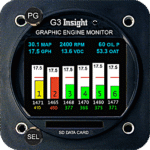
G3 Engine Monitor
G3 Engine Monitor Price range: $2,503.00 through $4,362.00

Fast delivery within 72 Hours

G2 Engine Monitor

Price range: $1,853.00 through $2,681.00

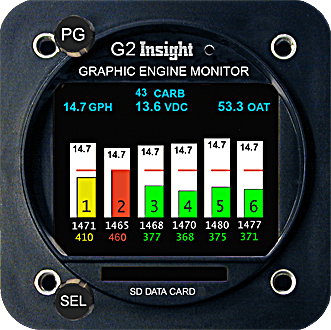
G2 Color  Graphic  Engine  Monitor

Great  Basic  Engine  Monitor – Unbeatable  Price With Functionality

Frequently Bought Together

Why Pilots Trust AVIA Avionics

  • Free Ground Shipping Over $399

Enjoy fast UPS, USPS, or DHL delivery on qualifying orders.

  • Shipping Worldwide

We use DHL or UPS for worldwide shipments.  Some shipments may require special processing.

  • No Sales Tax

Sales tax only applies where required by law.

  • 5 Star Service, White Glove

Strong customer service with fast response times.

Talk to a Real Aviation Expert

Need help placing an order?

Description

G2 Engine Monitor

Save fuel, save your engine!

Superior Patented Leaning Process:

  • G2/3/4 makes the lean process easy
  • No one else has this unique leaning process
  • G2/3/4 leaning is so easy and complete we patented the process - Read Patent

With patented features like:

  • Pilot settable lean threshold target
  • Colored box appears at peak
  • Lean boxes show temperature of how much lean or rich
  • Colored boxes show lean or rich
  • Lean boxes change at lean threshold
  • Fuel flow guidance for leaning
  • Fuel flow at each cylinder peak (GAMI SPREAD)
  • EGT temperature bars with numbers
  • CHT temperature bars with number, yellow warning and redline
  • TIT temperature bar with number, yellow warning and redline

Controlling the G2 instrument

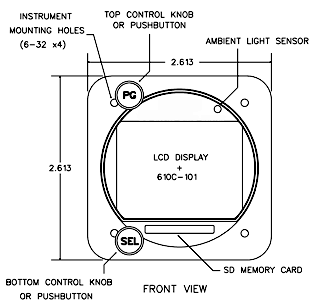
The instrument has two control knobs that operate combination rotary and push button switches. The top knob in general controls screen selection while the bottom knob controls items within the given screen. Each screen assigns its own functional needs to the controls that may change depending on context. A screen may also label the controls with guidance information like “Push to exit”.

The Bar-Graph Display Screen

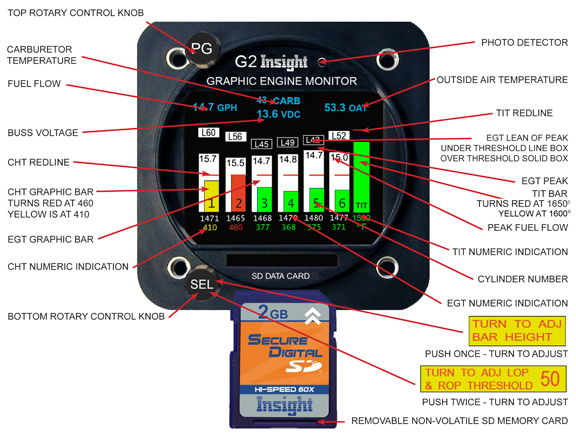
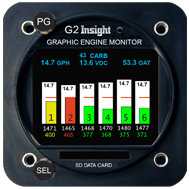
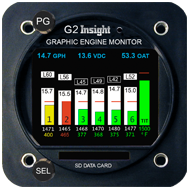
The Exhaust Gas Temperature is displayed in white bar graph form and is interpreted much like a conventional mercury thermometer. The higher the bar, the higher the temperature.

The cylinder head temperature is displayed in green single bar format. During normal operation it shows as a green illuminated bar in the lower half of the bar column. Since EGT is normally higher than CHT, the green bar which represents CHT is on top of the white illuminated EGT bar and stands out clearly. However, when the engine is shutdown, the EGT quickly drops to zero and the cylinders remain warm for sometime.

The G2 provides a reliable indication of cylinder head temperature even with the engine shut down. Should an EGT probe fail, the entire EGT column for that cylinder will go blank, and the numeric indication will show --- that is dashes, but the CHT bar will still remain green. The failure of one probe will not affect the display of any other probe.

An Easy Upgrade

 A key requirement of the G2 design was compatibility with previous GEM’s. We strive to never leave our loyal customers behind. Packing all the functionality of the G2 in package half the size of the original GEM took us to the limit of our patience many times but it was worth it. Fortunately its amazingly compact circuits will be built by robotic machines because most of the parts are too small to handle and too difficult to be seen by eye. Products like the modern cell phone have driven the electronic assembly technology we use a long way.

  • Insight, the originator of the Graphic Engine Monitor, surprised everyone by unveiling a new third generation GEM called G2 at Sun n Fun. By no means a lukewarm sequel, the G2 is a breakthrough product.
  • Featuring a bright full color display it offers numerous screens of new functionality previously unavailable anywhere.
  • While the original lean screen is gone, a vastly improved screen replaces it with special functionality for lean of peak operation. G2 logs data to readily available SD digital camera cards. A low cost card will store decades of flight data.
  • The new G2 writes PC compatible files and directories so no special software is required to process or transfer data.
  • Despite its enormous capabilities the new G2 is a compact size and plug-compatible replacement for all 610 GEMs.
  • Insight offers a generous GEM trade-in to make upgrades easy.

Aircraft install weight - A G3 for 6 cylinder with 8 foot harness, all sensors, wiring, connectors and probes is 4.2lbs.

Primary FAA and TC STCG1G2G3G4 SingleG4 TwinG9 Radial
       
Bezel Size2.25"2.25"2.25"3.125"3.125"3.125"
EGT - PrimaryEGT - PrimaryYesYesYesYesYesYes
CHT - PrimaryCHT - PrimaryYesYesYesYesYesYes
TIT - PrimaryTIT - PrimaryN/A1 or 2 Turbos1 or 2 Turbos1 or 2 Turbos1 or 2 Turbos1 or 2 Turbos
Probe DiagnosisYesYesYesYesYesYes
SD Card ReceptacleYesYesYesYesYesYes
Field UpdateableYesYesYesYesYesYes
Data Logging (SD Card Included)Yes *YesYesYesYesYes
Carb TemperatureYesYesYesYesYesYes
Lean/Rich of Peak MarginYes Basic OnlyYesYesYesYesYes
Fuel Flow YesYesYesYesYes
Fuel Flow Totalization (Split Tanks Fuel Flow Totalization Split Tanks)
 YesYes ✓ Yes ✓Yes ✓ Yes ✓YesYes
OAT YesYesYesYesYes
Buss Voltage YesYesYesYesYes
Fuel Injector Balance Analysis
  YesYesYesYes
RPM  YesYesYesYes
Manifold Pressure  YesYesYesYes
Oil Temperature  YesYesYesYes
Oil Pressure  YesYesYesYes
EGT Variation  YesYesYesYes
HP  YesYesYesYes
G-Force / TO Performance  YesYesYesYes
Turbulence  YesYesYesYes
GPS and TAS 1000 Interface  YesYesYesYes
Vibration  YesYesYesYes
Hard Landing Dynamic G-Force
  YesYesYes 
Fahrenheit or Celsius (users selectable)
  YesYesYesYes

* SD card included with G1 for software updates only.

Yes indicates capabilities of probes, sensors and features included in pricing of instrument.

Carb Temperature Probe included for carburetor equipped engines only.

TOP REASONS TO INSTALL A G2

  1. Best lean of peak process in the industry.
  2. The only nozzle balance analysis, the key to lean of peak.
  3. The only probe diagnostic screen
  4. Comprehensive data log windows files SD card
  5. Over the web software updates means constant improvement
  6. GEM plug compatible easy install
  7. Best technical support

G2 Buss Voltage

The G2 Buss Voltage attempts to display the buss voltage in green when it’s normal and red when it’s outside of normal. In an aircraft with a 12V electrical system the Buss Voltage will be annunciated in green so long as the voltage is 12.0V to 14.9V (inclusive). In an aircraft with a 24V electrical system the Buss Voltage will be annunciated in green so long as the voltage is 24.2V to 28.7V (inclusive). Below this range the alternator isn’t charging the battery and above that it’s overcharging, and the Buss Voltage will be annunciated in red. The instrument must be connected to the main voltage buss (not in series with something else, on a lighting buss, etc.) and must have a good low-resistance ground connection, otherwise the voltage measurement itself will be in error causing the Buss Voltage to indicate in red erroneously.

Pages you will see on your new G2

Monitor Page

Probe Analysis Page

Fuel Page

Lean of peak

Rich of peak

NEW! Fuel Screens

Previously, there was no standard color scheme in the configuration screens.
Now the selected line is yellow and the inactive lines are white.
YES/NO in red has been removed by displaying only the word YES or the word NO in green, when saving.
When there is a choice of several items the selected item is displayed in green.
Exactly one item is always selected.
The choices of temperature units are Celsius or Fahrenheit then either Fahrenheit or Celsius will be selected in green.
The FUEL TOTALIZATION screen has been improved and is even easier to use.

This change allows the pilot to see this screen before entering fuel on board.
Also setting initial fuel can be checked and corrected in flight.
Previously the pilot had to enter the amount of fuel onboard before he could view the FUEL TOTALIZATION page.
Now both the FUEL TOTALIZATION page and the FUEL SETUP page are accessible at any time.
On the FUEL TOTALIZATION screen simply press the PG (left) button to enter fuel, press it again when done.
As before you can top up the tank(s) by turning the SEL (right) knob counter clockwise on the very first click. Set total fuel onboard before take-off
Your G2-3-4 was preset at factory with your usable total fuel  
To reach FUEL TOTALIZATION screen from the main screen.  
Turn the PG knob counterclockwise one click.  
Push PG knob to go back and forth between the FUEL SETUP and FUEL TOTALIZATION screens  
On FUEL SETUP screen setting fuel gallons the lines  FUEL ADDED, SUBTOTAL and FUEL NOW color will be yellow.  
Turn SEL knob to set gallons (Clockwise or Counterclockwise one click for total preset total fuel for your aircraft)
At any time you can push PG knob to go back and forth between the FUEL SETUP and FUEL TOTALIZATION screens to add more fuel.

Videos On Aviation Products Manufuctured At Insight

6 Videos
Description

This video also shows what a 50 degree lean of peak would look like on a G Series monitor

Choosing the right engine monitor.

John M.
John M.Customer
Great service, product delivered as expected. Communicates well to the customer.